
Both Revit and AutoCAD APIs are very limited when it comes to geometry operations, and using their built-in methods for geometry analysis is often unoptmized, and computationally slow. This often leads to using tools such as Rhino.Inside, custom methods, or third-party libraries for optimization.
This blog provides insight into the open-source library NetTopologySuite, a 2D linear geometry package that is fast and is used for various purposes, including geospatial mapping and computational design.
1. Point Containment Checking
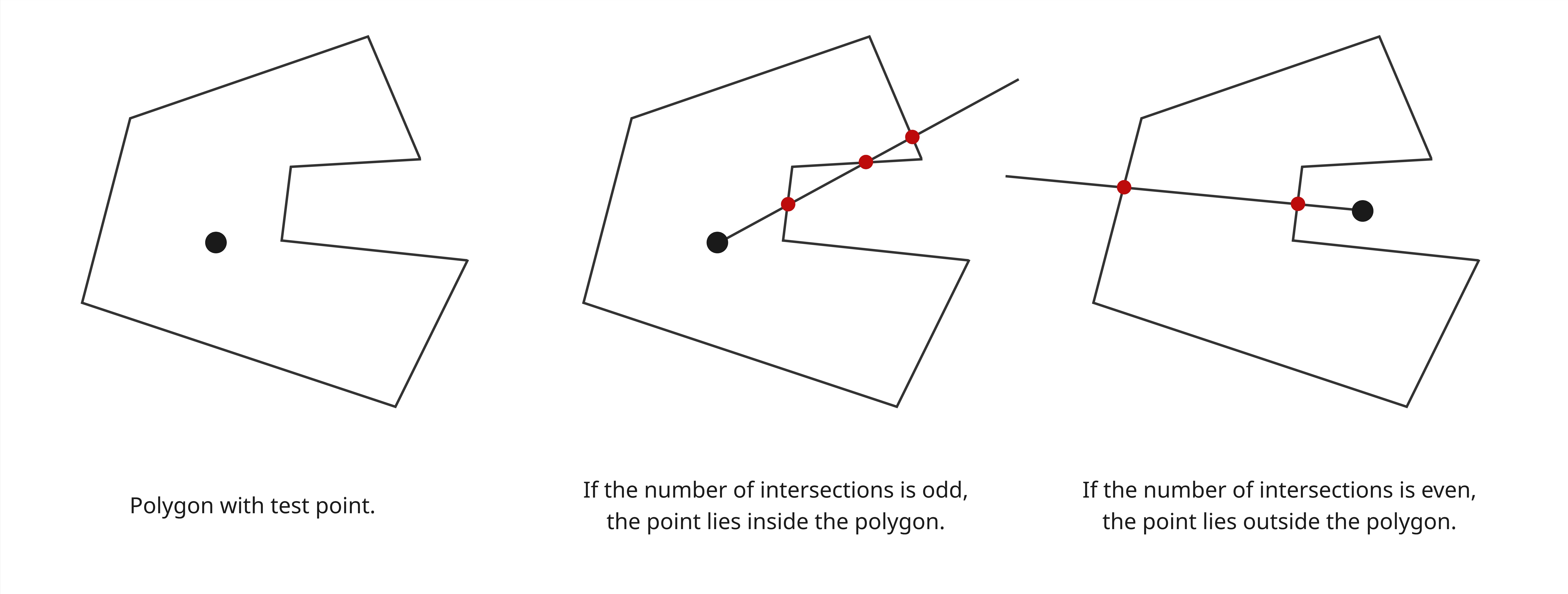
In Revit API, point containment checking is limited to defining if a point lies inside a SpatialElement, such as a Room or Area, or whether a UV coordinate lies on a Face. Though, there is no straightforward way to check whether a point is inside a CurveLoop, for example.
The following would be a check using the Revit API with CurveLoop representing polygon and XYZ representing point:
/// <summary>
/// Defines whether a specified <paramref name="point"/> lies inside a given
/// <paramref name="curveLoop"/> using a ray-casting intersection test.
/// </summary>
/// <remarks>
/// Assumes that <paramref name="point"/> and <paramref name="curveLoop"/>
/// lie in the same plane.
/// </remarks>
public bool IsPointInside(CurveLoop curveLoop, XYZ point)
{
    var intersections = new List<XYZ>();

    var curveLoopLength = curveLoop.GetExactLength();

    var referenceCurve = curveLoop.First();

    var referencePoint = (referenceCurve.GetEndPoint(0) +
                          referenceCurve.GetEndPoint(1)) * 0.5;

    var rayDirection = referencePoint.Subtract(point).Normalize();

    var rayEnd = point.Add(rayDirection.Multiply(curveLoopLength));

    var ray = Line.CreateBound(point, rayEnd);

    foreach (var curve in curveLoop)
    {
        var result = curve.Intersect(ray, out var results);

        if (result != SetComparisonResult.Overlap || results == null || results.Size == 0)
            continue;

        var intersection = results.get_Item(0).XYZPoint;

        intersections.Add(intersection);
    }

    return intersections.Count % 2 == 1;
}
The following uses NetTopologySuite to perform the same point containment check:
/// <summary>
/// Defines whether <param name="point"/> is inside the given <param name="curveLoop"/>
/// </summary>
/// <remarks>
/// Assumes that <paramref name="point"/> and <paramref name="curveLoop"/>
/// lie in the same plane.
/// </remarks>
public bool IsPointInside(CurveLoop curveLoop, XYZ point)
{
    var polygon = RevitToNetTopologyConverter.CurveLoopToPolygon(curveLoop);

    var netTopologyPoint = RevitToNetTopologyConverter.XyzToPoint(point);

    return polygon.Contains(netTopologyPoint);
}
2. Polygon's Centroid
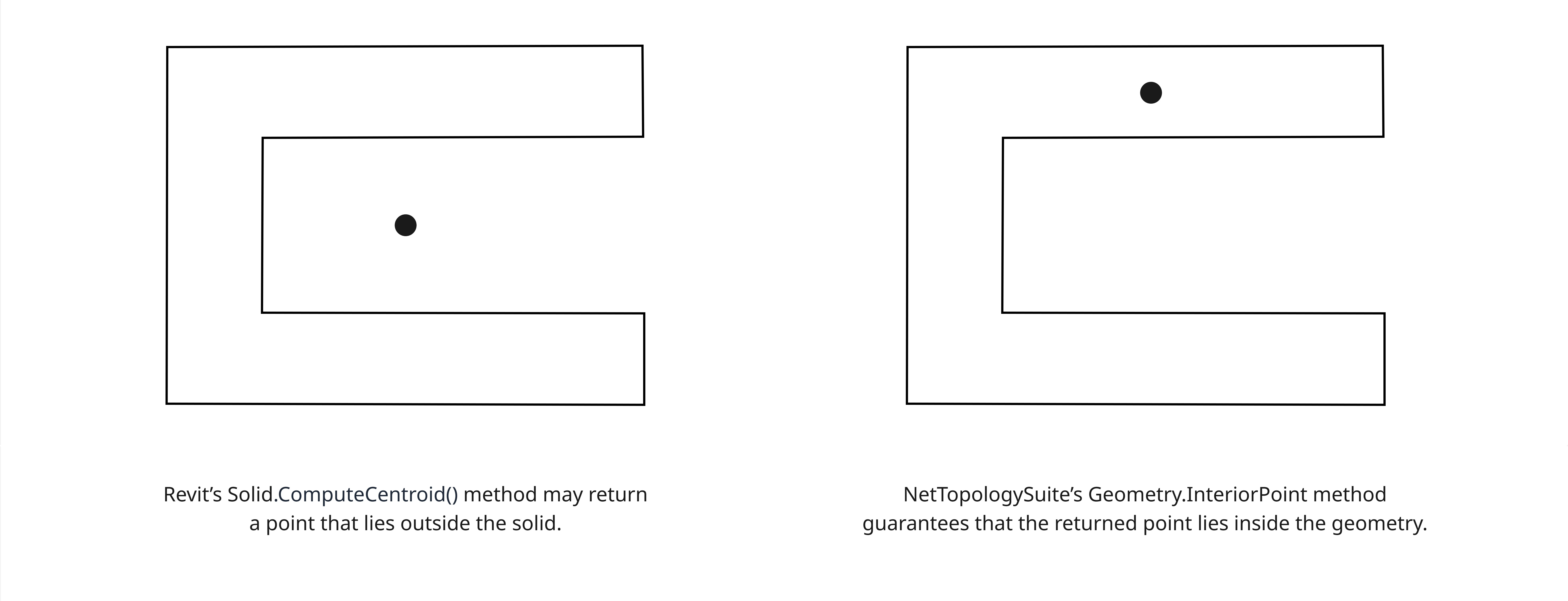
Another simple though missing Revit API function is finding centroid of the polygon.
Existing Revit API method Solid.ComputeCentroid() returns a wrong result for complex shapes like on the image below where the centroid is not contained within the solid.
/// <summary>
/// Returns the centroid of the given <param name="curveLoop"/> as <see cref="XYZ"/> point.
/// </summary>
public XYZ GetCentroid(CurveLoop curveLoop)
{
    var polygon = RevitToNetTopologyConverter.CurveLoopToPolygon(curveLoop);

    var centroid = polygon.InteriorPoint;

    var centroidRevit = NetTopologyToRevitConverter.CoordinateToXyz(centroid.Coordinate);

    return centroidRevit;
}
3. Randomizing Points Inside Geometry
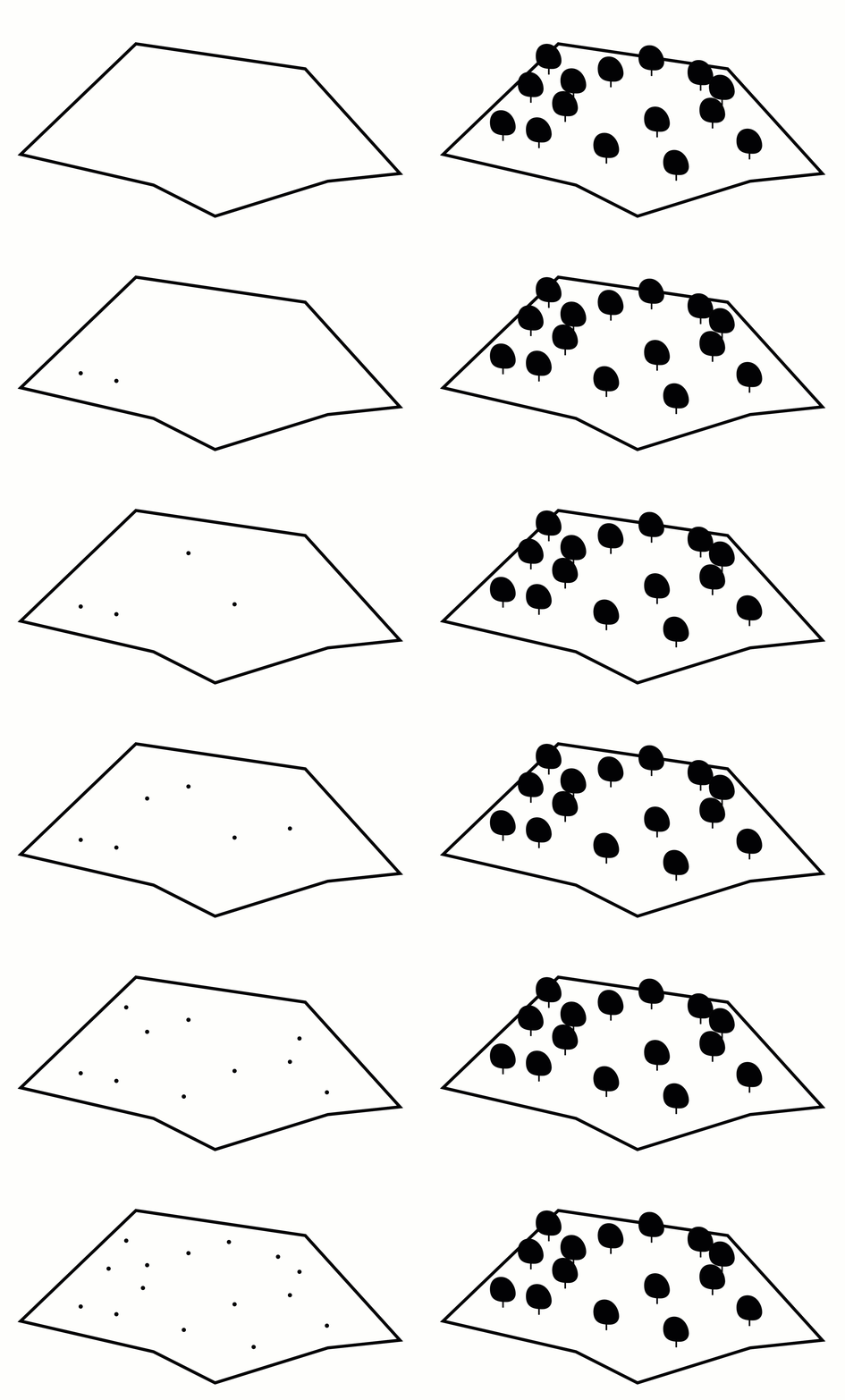
Points randomizer can be used for scattering objects like vegetation, people, furniture, and other elements in a natural way. NetTopologySuite provides a class called RandomPointsBuilder specifically for that.

/// <summary>
/// Randomizes points on the given <param name="curveLoop"/>.
/// The number of points is defined by <param name="numberOfPoints"/>.
/// </summary>
public List<XYZ> RandomizePoints(CurveLoop curveLoop, int numberOfPoints)
{
    var polygon = RevitToNetTopologyConverter.CurveLoopToPolygon(curveLoop);

    var geometryFactory = new GeometryFactory();

    var builder = new RandomPointsBuilder(geometryFactory)
    {
        NumPoints = numberOfPoints
    };

    builder.SetExtent(polygon);

    var randomCoordinates = builder.GetGeometry().Coordinates;

    return randomCoordinates.Select(NetTopologyToRevitConverter.CoordinateToXyz).ToList();
}
4. Geometry Relationships
NetTopologySuite provides methods for analyzing relationships between geometries, including computing the minimum distance between two shapes such as points, lines, or polygons. This can be useful for collision detection or clearance checking.
5. Encoding/Decoding geometry
One of the powerful feature of NetTopologySuite is its ability to encode geometry to various standard formats including GeoJSON that can be useful for working with maps in web development. Below is an example of how to encode a geometry object into a string and how to decode it back into a geometry instance.
/// <summary>
/// Encodes a NetTopologySuite Geometry to a GeoJSON string.
/// </summary>
public string GeometryToGeoJson(Geometry geometry)
{
    var writer = new GeoJsonWriter();

    return writer.Write(geometry);
}

/// <summary>
/// Decodes a GeoJSON string to a NetTopologySuite Geometry.
/// </summary>
public Geometry GeoJsonToGeometry(string geoJson)
{
    var reader = new GeoJsonReader();

    return reader.Read<Geometry>(geoJson);
}
6. Geometry-aligned Bounding Box
- The Revit API method
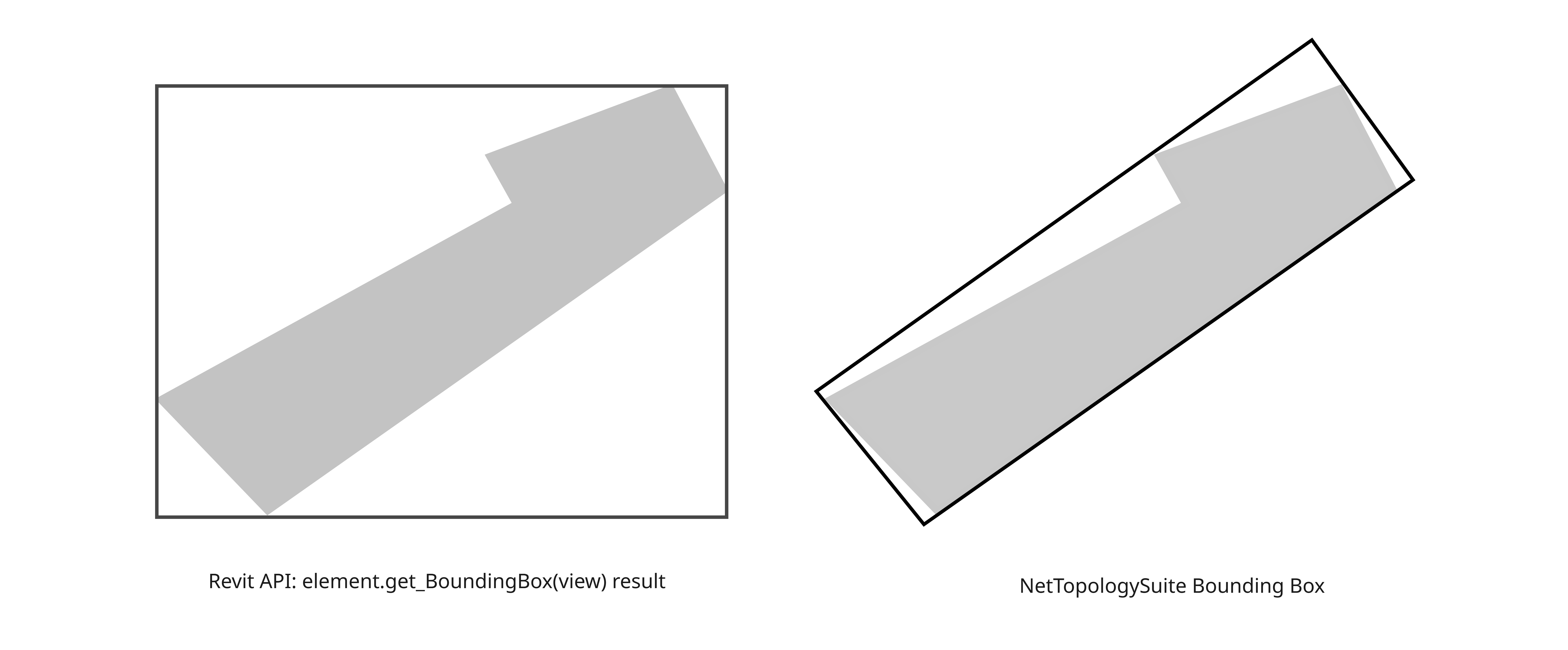
element.get_BoundingBox(view)returns a bounding box aligned to the global axes and does not provide a built-in way to compute a bounding box aligned to the element’s actual geometry. NetTopologySuite, however, does support creating geometry-aligned bounding box: -
/// <summary>
/// Calculates the geometry-aligned bounding box of the given <param name="polygon"/>.
/// </summary>
public CurveLoop GetGeometryAlignedBoundingBox(Polygon polygon)
{
    var minDiameter = new MinimumDiameter(polygon);

    var geometryAlignedBoundingBox = minDiameter.GetMinimumRectangle();

    var curveLoop = NetTopologyToRevitConverter.
        PolygonToCurveLoop(geometryAlignedBoundingBox as Polygon);

    return curveLoop;
}
7. Creating Convex Hull
NetTopologySuite can generate a convex hull, which is the smallest convex polygon that fully contains a set of points:

/// <summary>
/// Creates a 2D convex hull geometry from a collection of Revit <see cref="XYZ"//> points.
/// </summary>
public Geometry CreateConvexHull(List<XYZ> points)
{
    var coordinates = points.Select(RevitToNetTopologyConverter.XyzToCoordinate).
        ToArray();

    var geometryFactory = new GeometryFactory(new PrecisionModel());

    var pointsCollection = geometryFactory.CreateMultiPointFromCoords(coordinates);

    var convexHull = new ConvexHull(pointsCollection);

    var geometry = convexHull.GetConvexHull();

    return geometry;
}
8. Graphs
NetTopologySuite allows to work with
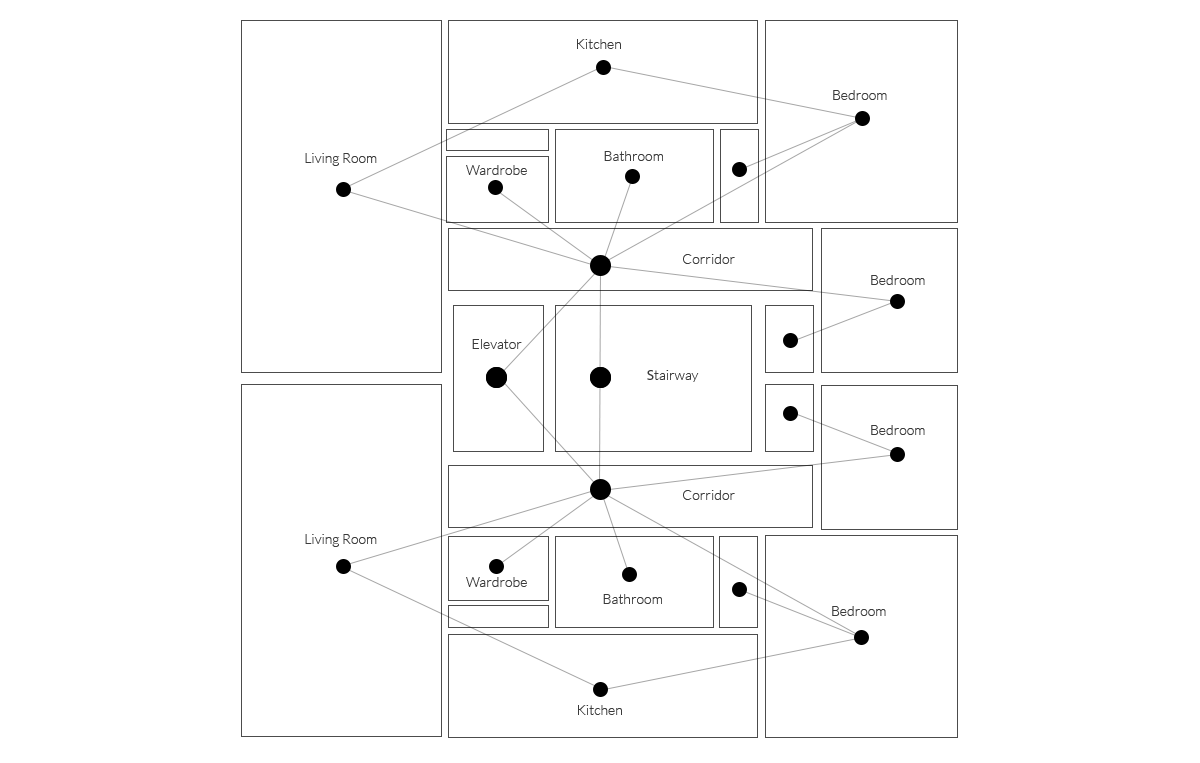
PlanarGraphdesigned for geometric operations on it. This can be useful for representing element dependencies and their spatial relationships. For example, a floor plan can be seen as a graph where rooms are nodes and doors are edges connecting those nodes. This allows the use of a ton of well behaved computer science algorithms such as Shortest Path Finder.
Workflow
To use NetTopologySuite in Revit API plugins, you need classes that convert Revit geometry into NetTopologySuite geometries and translate the results back into Revit geometry when needed. The example below illustrates a class that performs this conversion and also shows the methods used above, where different NetTopologySuite features are applied.
/// <summary>
/// Responsible for converting Revit geometry to NetTopologySuite geometry.
/// </summary>
public static class RevitToNetTopologyConverter
{
    /// <summary>
    /// Converts a <see cref="XYZ"/> to a <see cref="Point"/>
    /// by projecting onto XY plane.
    /// </summary>
    /// <remarks>
    /// The X and Y coordinates are rounded to handle minor floating-point
    /// inaccuracies in Revit geometry.
    /// </remarks>
    public static Point XyzToPoint(XYZ point) =>
        new(Math.Round(xyz.X, 8), Math.Round(xyz.Y, 8));

    /// <summary>
    /// Converts <param name="xyz"/> to a <see cref="Coordinate"/>
    /// by projecting onto XY plane.
    /// </summary>
    public static Coordinate XyzToCoordinate(XYZ xyz) => new(xyz.X, xyz.Y);

    /// <summary>
    /// Converts a <param name="curveLoop"/> to a <see cref="LinearRing"/>
    /// by projecting curveLoop points onto its XY plane.
    /// </summary>
    private static LinearRing CurveLoopToLinearRing(CurveLoop curveLoop)
    {
        var curveLoopFirstPoint = curveLoop.First().GetEndPoint(0);

        var coordinates = new List<Coordinate>()
        {
            XyzToCoordinate(curveLoopFirstPoint)
        };

        foreach (var curve in curveLoop)
        {
            var startpoint = curve.GetEndPoint(1);

            var coordinate = XyzToCoordinate(startpoint);

            coordinates.Add(coordinate);
        }

        var linearRing = new LinearRing(coordinates.ToArray());

        return linearRing;
    }

    /// <summary>
    /// Converts a <param name="curveLoop"/> to a <see cref="Polygon"/>
    /// by projecting curveLoop points onto its XY plane.
    /// </summary>
    public static Polygon CurveLoopToPolygon(CurveLoop curveLoop)
    {
        var linearRing = CurveLoopToLinearRing(curveLoop);

        var polygon = new Polygon(linearRing);

        return polygon;
    }
}
Below is an example class for converting NetTopologySuite geometry back to Revit Geometry.
/// <summary>
/// Responsible for converting NetTopologySuite geometries to Revit geometries.
/// </summary>
public static class NetTopologyToRevitConverter
{
    /// <summary>
    /// Converts <param name="coordinate"/> to <see cref="XYZ"/>
    /// by projecting it onto the XY plane.
    /// </summary>
    public static XYZ CoordinateToXyz(Coordinate coordinate)
        => new XYZ(coordinate.X, coordinate.Y, 0);

    /// <summary>
    /// Converts <param name="polygon"/> to <see cref="CurveLoop"/>
    /// by projecting its exterior ring onto the XY plane.
    /// </summary>
    public static CurveLoop PolygonToCurveLoop(Polygon polygon)
    {
        var exteriorRing = polygon.ExteriorRing;

        var coordinates = exteriorRing.Coordinates;

        var points = new List<XYZ>();

        foreach (var coordinate in coordinates)
        {
            var point = CoordinateToXyz(coordinate);

            points.Add(point);
        }

        var curveLoop = new CurveLoop();

        for (var i = 0; i + 1 < points.Count(); i++)
        {
            var startPoint = points[i];

            var endPoint = points[i + 1];

            var line = Line.CreateBound(startPoint, endPoint);

            curveLoop.Append(line);
        }

        return curveLoop;
    }
}
Limitations
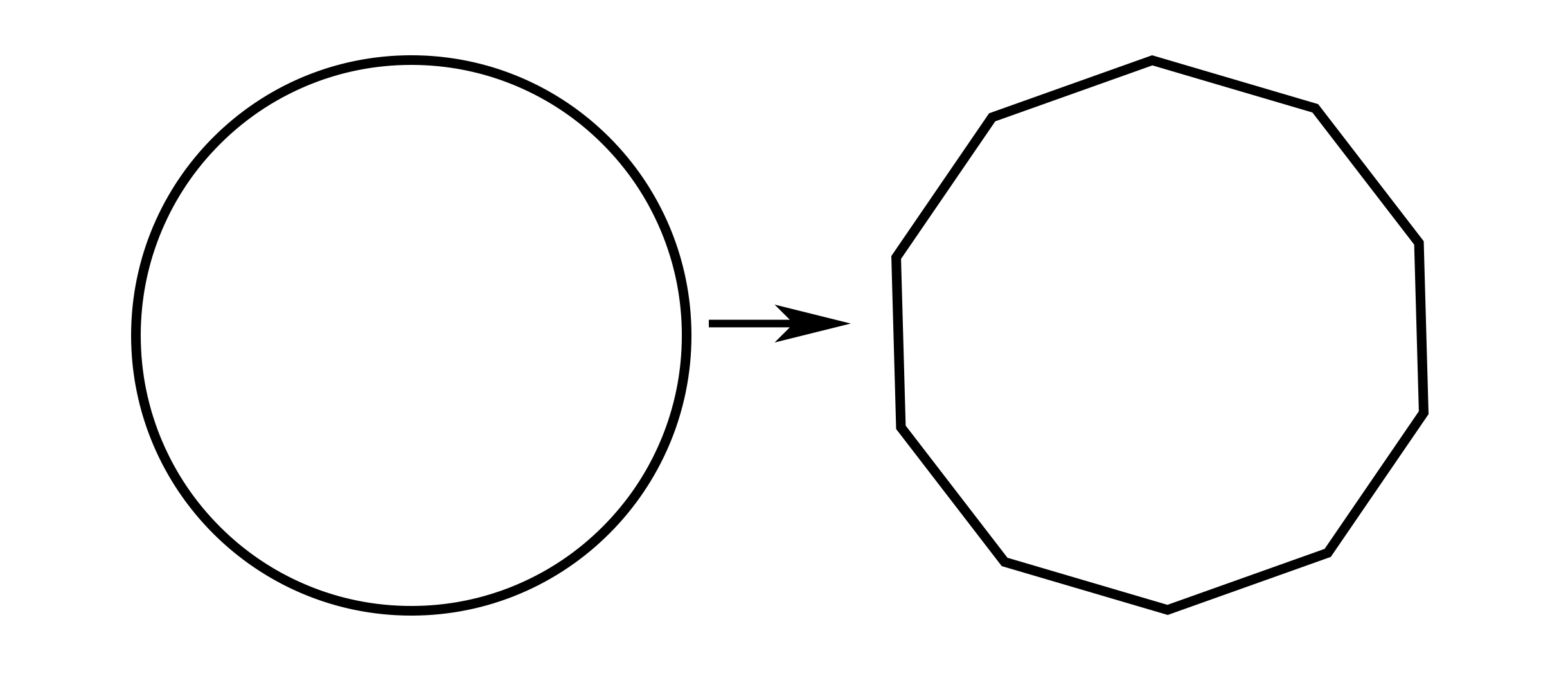
- NetTopologySuite is based on a linear geometry model, so curves must be approximated as sequences of straight line segments.
- NetTopologySuite is a 2D geometry library, while Revit is a 3D modeling software.
- NetTopologySuite’s documentation is often sparse and lacks detailed examples.
Sources
Official Documentation: NetTopologySuite GitHub Wiki
API Reference: NetTopologySuite API Docs
NuGet Package: NetTopologySuite on NuGet
NetTopologySuite.IO.GeoJSON for encoding and decoding GeoJSON with NetTopologySuite geometries: NetTopologySuite.IO.GeoJSON on NuGet